
Gaming desktop · Aurora ACT1250
Alienware Aurora with RTX 5070
Our pick for most desktop buyers: a Core Ultra 7 265F, a desktop RTX 5070 with 12GB of GDDR7, 32GB of DDR5 and a 1TB SSD. It is sized for a 1440p monitor, and Dell adds a year of onsite service.
Check Price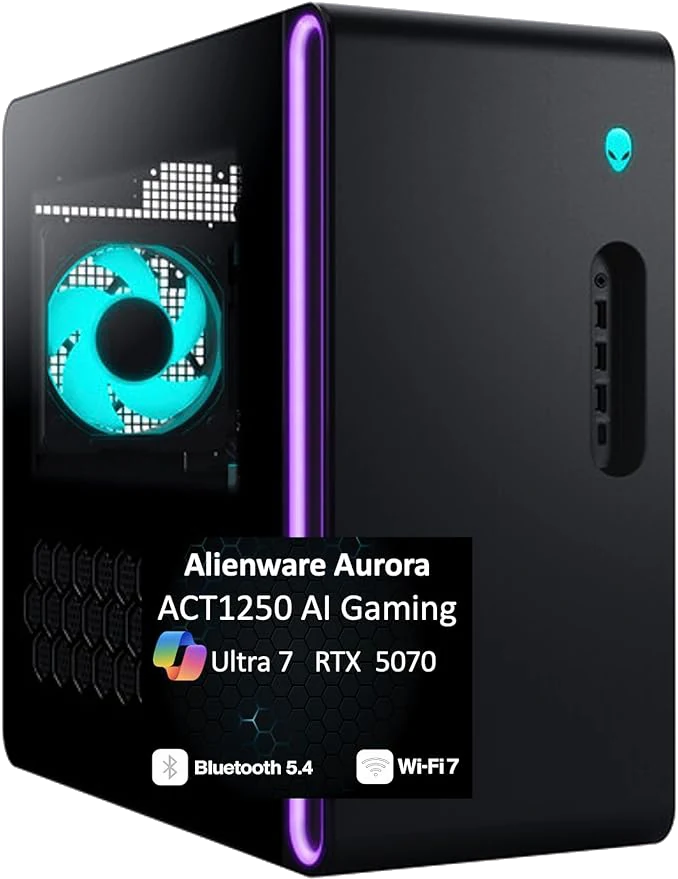
- RTX 507012GB GDDR7, 250W
- 32GBDDR5
- 20 coresCore Ultra 7 265F
- 1 yearDell onsite service
Should you buy it?
Buy it if
- You play at 1440p. The desktop RTX 5070 has 12GB of video memory. The laptop chip with the same name has 8GB.
- You want one company to call when something fails. The whole machine is covered by one Dell warranty, with a year of onsite service.
Look elsewhere if
- You play at 4K. Dell builds the Aurora with an RTX 5080 (16GB) for that, and only the Area-51 takes an RTX 5090.
- You only play at 1080p. The RTX 5060 Ti build handles 1080p on the same processor.
- You want to choose every part yourself. The motherboard and power supply are Dell's own, so neither can be replaced with an off-the-shelf part.
What to know before you buy
Desktop RTX 5070 or laptop RTX 5070
Same name, different chips. The desktop RTX 5070 in this Aurora has 12GB of GDDR7 and a 250W board power. The laptop RTX 5070 in the 16X Aurora has 8GB and runs at up to 125W. At 2560×1440 the extra memory lets you keep texture settings high in new games, where 8GB cards already need them lowered.
Check the power supply wattage
Dell's minimum supply for an RTX 5070 in this tower is 750W. The ACT1250's power supplies go up to 1000W, and Dell's thermal table rates the 1000W unit for cards up to 450W, which covers an RTX 5080. The wattage on the listing decides whether a later GPU upgrade also needs a new supply, and the supply is Dell's own form factor.
Memory and storage
The 32GB uses both memory slots. Dell supports up to 64GB (2 × 32GB) of DDR5 at 5200 MT/s, or 6400 MT/s with Dell-qualified XMP modules. There are two M.2 slots for 2230 or 2280 PCIe Gen 4 drives and a bay for a 3.5-inch hard drive.
Where the monitor plugs in
Into the graphics card. The motherboard has no video outputs, and the 265F has no integrated graphics. Dell lists three DisplayPort 2.1b outputs and one HDMI 2.1b on its RTX 50-series cards. For a monitor to match, our monitor guide covers the 1440p models.
Noise
We haven't found published noise or temperature measurements for the ACT1250. This build cools the processor with air. Command Center lets you offset the default fan curve but not draw your own.
Full specifications
| This configuration | |
|---|---|
| Processor | Intel Core Ultra 7 265F: 20 cores (8P + 12E), up to 5.3GHz, 65W, no integrated graphics |
| Graphics | NVIDIA GeForce RTX 5070, 12GB GDDR7, 250W |
| Memory | 32GB DDR5 |
| Storage | 1TB PCIe Gen 4 NVMe SSD |
| Cooling | Air cooler |
| Power supply | 750W or larger (Dell's minimum for the RTX 5070); check the listing |
| Service | 1 year onsite |
| Platform | |
| Chipset | Intel Z890 |
| Memory slots | 2 × DDR5, 5200 MT/s (6400 MT/s with Dell XMP memory), up to 64GB |
| Drive bays | 2 × M.2 2230/2280 PCIe Gen 4 NVMe, 1 × 3.5-inch |
| Expansion slots | 1 × PCIe 5.0 x16, 2 × PCIe 4.0 x4 |
| Largest graphics card | 305 mm long, 134.45 mm tall, 55.12 mm thick, 1.80 kg |
| Ports | |
| Front | Headset jack, 2 × USB 3.2 Gen 1 (5Gbps), 1 × USB 3.2 Gen 1 with PowerShare, 1 × USB-C 3.2 Gen 2 (10Gbps) with PowerShare |
| Rear | USB4 Type-C (20Gbps) with Power Delivery, USB-C 3.2 Gen 2 (10Gbps), 2 × USB 3.2 Gen 1, 2 × USB 2.0 with SmartPower, RJ45 (2.5Gbps), optical S/PDIF, line-in, line-out |
| Video | On the graphics card only: 3 × DisplayPort 2.1b, 1 × HDMI 2.1b |
| Network and audio | |
| Ethernet | Killer E3100G, 2.5Gbps |
| Wi-Fi | Intel BE200, Wi-Fi 7 |
| Bluetooth | 5.4 |
| Audio | Realtek ALC1220, 5.1 channels with optical S/PDIF |
| Size and weight | |
| Height × width × depth | 418 × 197 × 458.4 mm (16.46 × 7.75 × 18.05 in) |
| Weight | up to 15.37 kg (33.88 lb), depending on configuration |
Where to buy it
Amazon listing B0DPKLJ4CV: Core Ultra 7 265F, RTX 5070 12GB, 32GB DDR5, 1TB SSD, air cooling
On November 4, 2026 Amazon.com sold it itself, so the Dell warranty only needs registering with the service tag.
Compare it with
 The entry Aurora, for 1080p
Alienware Aurora with RTX 5060 Ti
Core Ultra 7 265F, RTX 5060 Ti 8GB, 500W
Specs and buying guide
 The only Alienware with an RTX 5090
Alienware Area-51 with RTX 5090
Core Ultra 9 285K, RTX 5090 32GB, 64GB DDR5
Specs and buying guide
 For competitive 1440p
Alienware AW2723DF
27-inch Fast IPS, 240Hz, 280Hz overclocked
Specs and buying guide