
34-inch QD-OLED monitor
Alienware AW3423DW
The original 34-inch QD-OLED ultrawide, built around Nvidia's G-Sync Ultimate module: 3440×1440 at 175Hz over DisplayPort, 0.1 ms and DisplayHDR True Black 400, in Lunar Light white.
Check Price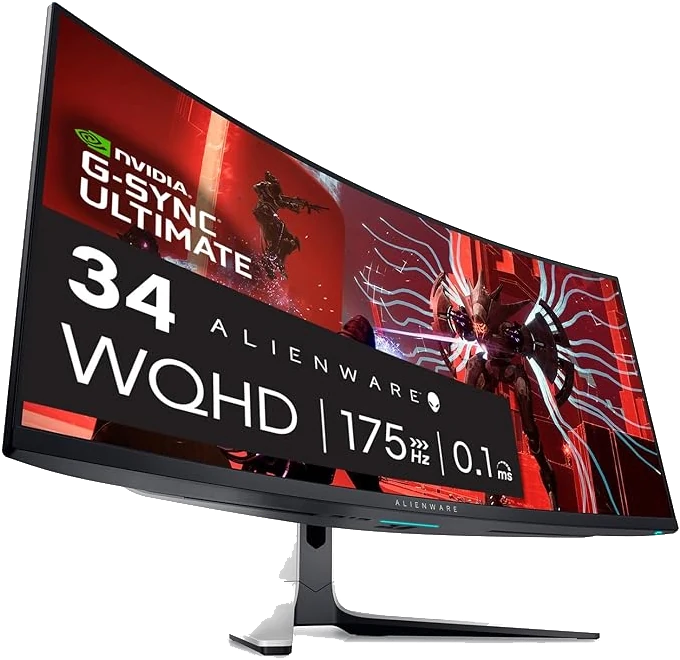
- 175HzDisplayPort; 100Hz on HDMI
- G-Sync UltimateNvidia module
- 0.1 msgray-to-gray
- 10-bitcolor up to 144Hz
Should you buy it?
Buy it if
- You have an Nvidia graphics card. The G-Sync Ultimate module handles variable refresh in hardware, and the panel runs at 175Hz, 10Hz more than the AW3423DWF.
- You want two HDMI inputs. It has two HDMI 2.0 ports (100Hz each) next to one DisplayPort for the PC.
Look elsewhere if
- You connect two PCs over DisplayPort. There is one DisplayPort input; the AW3423DWF has two.
- You want 10-bit color at full speed. Above 144Hz the panel drops to 8-bit, 16.7 million colors.
- You want Amazon as the seller. Third-party sellers only on November 5, 2026, so Dell's warranty needs an ownership transfer.
What to know before you buy
DW or DWF
Both use the same first-generation 34-inch QD-OLED panel. The DW has the G-Sync Ultimate module and runs at 175Hz. The DWF replaces the module with a standard scaler: 165Hz over DisplayPort, FreeSync Premium Pro with G-Sync Compatible certification, a second DisplayPort input and a console mode. The difference you'll notice in games is 10Hz, so choose by the inputs and the sync technology you need.
10-bit up to 144Hz
Dell lists 1.07 billion colors (10-bit) up to 144Hz and 16.7 million (8-bit) at 175Hz. For HDR games and video, set 144Hz and keep the full color depth.
Fans and flicker
Dell says the DW's fans are designed to stay under 32 dB. Next to a gaming PC under load that is easy to miss; in a silent room you may hear them.
Dell's firmware notes for the DW list a fix for occasional flicker, so update the firmware first. If dark loading screens still pulse, cap the frame rate a few fps below the refresh rate.
Burn-in and pixel refresh
Dell sells it with a 3-year warranty that includes burn-in; check the terms for your region. The monitor asks for a pixel refresh after 4 hours of use and runs it in standby if you ignore the prompt. It takes about 7 minutes; leave it plugged in.
Stand and weight
The panel weighs 6.92 kg (15.26 lb) without the stand and 10.37 kg (22.86 lb) with the stand and cables. The stand adjusts 110 mm in height, tilts from -5° to 21° and swivels 20° each way; it does not pivot. VESA 100 mm mounting works with the stand removed.
Full specifications
| Panel | |
|---|---|
| Size and type | 34.18″ curved QD-OLED, 1800R, 21:9 |
| Resolution | 3440×1440, 110 PPI |
| Refresh rate | 175Hz over DisplayPort, 100Hz over HDMI |
| Response time | 0.1 ms gray-to-gray |
| HDR | VESA DisplayHDR True Black 400 |
| Contrast | 1,000,000:1 |
| Color | 99.3% DCI-P3, 149% sRGB; 1.07 billion colors up to 144Hz, 16.7 million at 175Hz |
| Adaptive sync | NVIDIA G-SYNC Ultimate (hardware module) |
| Connections | |
| Video inputs | 1 × DisplayPort 1.4, 2 × HDMI 2.0 |
| USB | USB 3.2 Gen 1 hub: 1 upstream, 4 downstream (2 rear, 2 bottom; one charges at up to 2A) |
| Audio | Line-out, headphone jack; no speakers |
| Stand and size | |
| Height adjustment | 0 to 110 mm |
| Tilt and swivel | Tilt -5° to 21°, swivel -20° to 20°; no pivot |
| Wall mount | VESA 100 × 100 mm |
| Weight | 6.92 kg (15.26 lb) panel only; 10.37 kg (22.86 lb) with stand and cables |
| Finish | Lunar Light (white) |
| Power and warranty | |
| Power | 42.3W in use, 200W maximum |
| Warranty | 3 years, including burn-in |
Where to buy it
Amazon listing B09VQ48X5Q: AW3423DW, 34-inch QD-OLED, 175Hz, G-Sync Ultimate
On November 5, 2026 only third-party sellers offered it. Keep the receipt: Dell's warranty needs an ownership transfer when the seller is not Amazon.com.
Compare it with
 Sold by Amazon itself
Alienware AW3423DWF
34-inch QD-OLED, 165Hz, two DisplayPort inputs
Specs and buying guide
 For competitive 1440p
Alienware AW2723DF
27-inch Fast IPS, 240Hz, 280Hz overclocked
Specs and buying guide
 Our pick for 1440p
Alienware Aurora with RTX 5070
Core Ultra 7 265F, RTX 5070 12GB, 32GB DDR5
Specs and buying guide